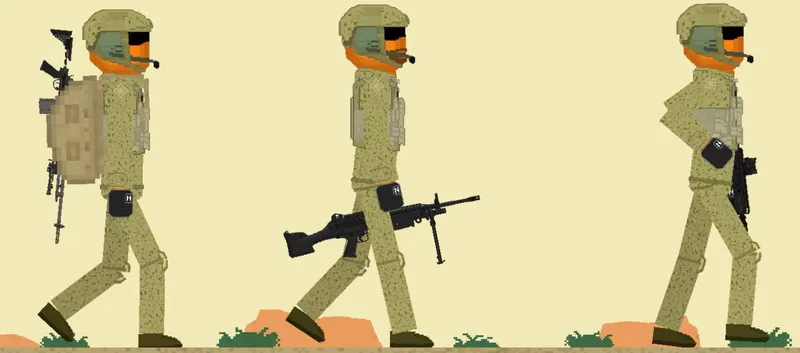
NAVY SEALS by Cat/Bad Dog Description:Navy SEALs, are the U.S. Navy’s primary special operations force and a component of the Naval Special Warfare Command. Among the SEALs’ main functions are conducting small-unit special operation missions in maritime, jungle, urban, arctic, mountainous, and desert environments. SEALs are typically ordered to capture or kill high-level targets, or to gather intelligence behind enemy lines. SEAL team personnel are hand-selected, highly trained, and possess a high degree of proficiency in unconventional warfare , direct action , and special reconnaissance , among other tasks like sabotage, demolition, intelligence gathering, and hydro-graphic reconnaissance, training, and advising friendly militaries or other forces. All active SEALs are members of the U.S. Navy. Hope yall like it: > Weapons made by me
The Fsave folder is in Android >> Data >> com.ONRIStudio.JustPlayground >> Files >> Saves Note that the mod file for the Fruit Playground ends with .fsave In order to install the .fsave
how to put mods in fruit playground .Fsave
1. Download the NAVY SEALS mods file and save it
2.Open Zarchiver /FV File Manager and go to the Download folder to find the zip pack you just download.Extract to./<Archive name>/
3. Enter the game and go to any map
4. Select the save tab
5. Click on the “Install save file” button
6. Select the desired .Fsave file
7. Everything is ready, the save is installed and ready to use
how to put mods in fruit playground .Fmod
The mods folder is in Android >> Data >> com.ONRIStudio.JustPlayground >> Files >> Mods Note that the mod file for the Fruit Playground ends with .fmod In order to install the mod
1. Download the NAVY SEALS mods file and save it
2.Open Zarchiver /FV File Manager and go to the Download folder to find the zip pack you just download.Extract to./<Archive name>/
3. Enter the game and go to the editor using the “Editor” button in the main menu
4. Click on the “Install mod file” button
5. Select the desired .Fmod file
5. Everything is ready, the mod is installed
After downloading the fruit playground mods, please load the mod once in the fruit playground and then enter the map to use the mod. If it does not take effect, please restart the game.
After downloading different modules, each module may be placed in different categories in the menu bar on the left side of the map, please pay attention to find it.
Due to the problem of the game itself, using too many mods to load may cause black screen and freeze problems, which can be solved by clearing the mod function and restarting the game.
